
5 Reasons Your Website Is Loading Slowly In South Africa
These days, a fast loading website isn’t a nice to have, it’s expected. But for a lot of Cape Town businesses, it’s where things start to fall apart. On the surface, everything looks fine. The site is live, it looks good on an office laptop, and there are no obvious issues. The problem shows up where it actually matters, on real South African mobile networks, in the hands of real customers. That’s where slow load times creep in, people lose patience, and leave before they’ve even read a word.
If you’ve been questioning why your website feels slow in South Africa, it’s rarely down to a single issue. More often, it’s a mix of small decisions made over time, from outdated setups to heavier pages, all adding up into a performance problem that’s now costing you attention and potential leads.
The upside is that this isn’t something you’re stuck with. Most of these issues can be identified fairly quickly, and more importantly, they can be fixed. Here are the five most common reasons behind it.
Why Your Website Speed Actually Matters
Speed isn't a technical vanity metric. It's directly tied to whether the person who just found your business online actually becomes a customer, or quietly leaves and never comes back.
The numbers make this hard to ignore. 47% of consumers expect a website to load in 2 seconds or less, and 40% will abandon a site that takes more than 3 seconds. On mobile, the patience runs out even faster. 53% of mobile visitors will leave a page if it takes longer than three seconds to load. And in South Africa, where mobile network speeds can vary wildly depending on where your customer is standing, three seconds can feel generous.
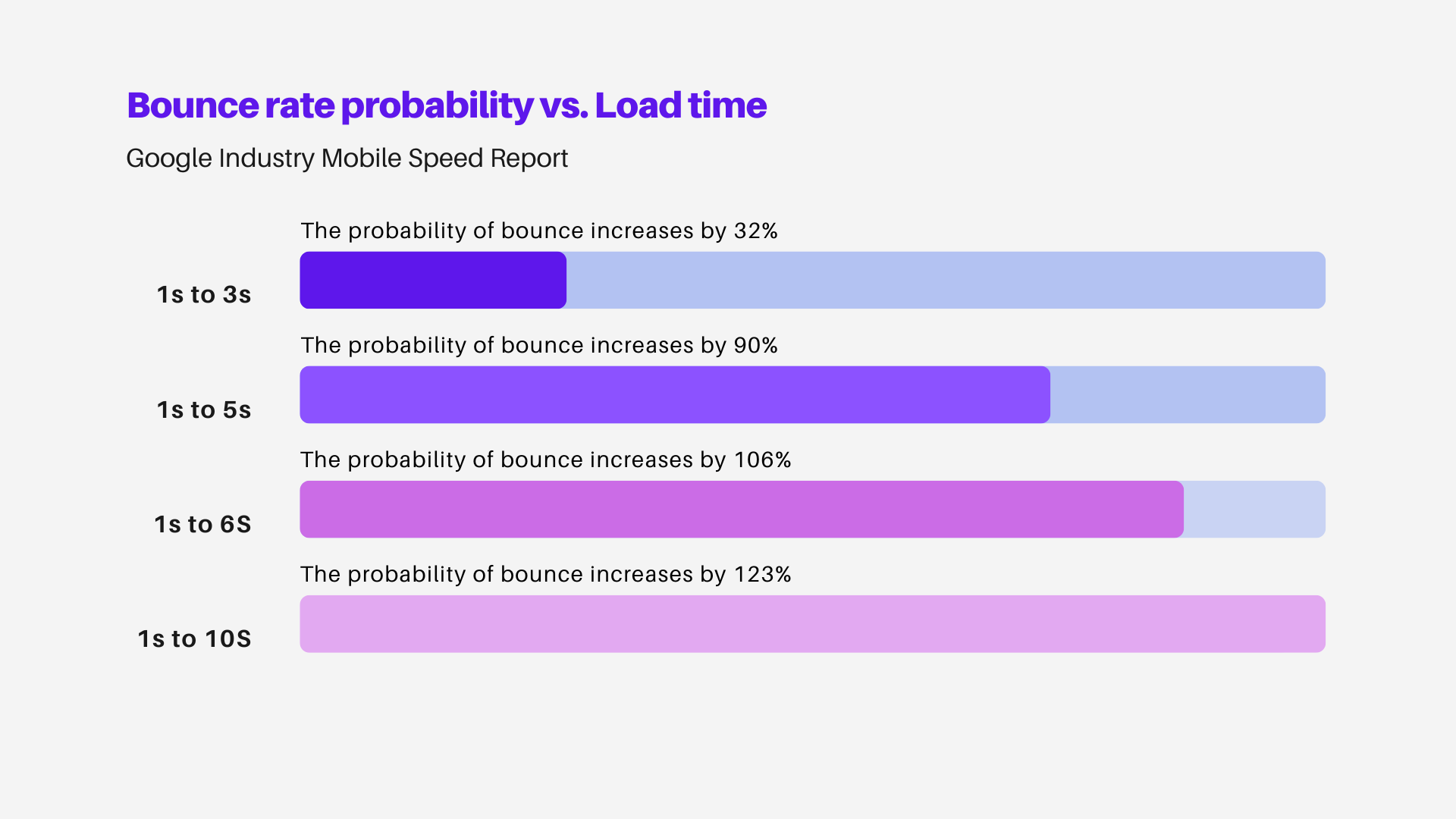
The drop-off compounds quickly. Going from a 1-second load time to just 3 seconds increases your bounce probability by 32%. By 5 seconds, that number jumps to 90%. Put simply, the longer your site takes, the more people you are losing, and most of them won't tell you why. [1]
Now that you know speed is not a nice to have we can move to the solutions to improve your site's loading speed.
Reason 1: Your Website Is Hosted on an Overseas Server
This is the most widespread and most underestimated cause of slow websites for South African businesses. When someone in Cape Town visits your site, their browser sends a request to wherever your server is physically located. If that server is in London, Frankfurt, or Dallas, that request has to travel thousands of kilometres, and the response has to travel back. Every single time. For every element on the page.
The resulting delay is called latency, and it adds up fast. A site hosted locally or with a content delivery network that has South African nodes will consistently outperform an identically built site hosted overseas, simply because the physical distance is shorter.
What to look for:
Ask your current host where their servers are physically located. Check whether your hosting plan includes CDN (content delivery network) support. Consider South African hosting providers or global hosts with Johannesburg or Cape Town nodes.
Most small business websites were set up quickly and cheaply, often with whoever offered the lowest monthly rate. Hosting location rarely came into the conversation. It should have.
Reason 2: Your Images Are Far Too Large
Unoptimised images are responsible for a startling proportion of slow load times across the web, and South African websites are no exception. A homepage hero image shot on a DSLR and uploaded straight from the camera can be five to ten megabytes. A mobile user on a variable LTE connection is expected to download that before they see anything meaningful on screen.
The fix is not complex. It just requires intention.
Practical steps:
- Compress all images before uploading using tools like Squoosh, TinyPNG, or ShortPixel
- Convert images to WebP format, which delivers comparable quality at a fraction of the file size
- Use correctly sized images: a 2000px-wide image displayed at 400px wide is still downloading at full resolution unless resized
- Enable lazy loading so images below the fold only download when the user scrolls to them
For businesses dealing with slow website speed in Cape Town, image optimisation alone can often cut load times by thirty to fifty percent. It is consistently the highest-impact, lowest-cost fix available.
Reason 3: You're Running Too Many Plugins
WordPress powers a significant portion of South African business websites, and its plugin ecosystem is one of its greatest strengths. It's also one of its most common liability points.
Every active plugin adds code that the browser must download, parse, and execute. One or two well-built plugins create no meaningful problem. But many small business WordPress sites accumulate plugins over time, a booking plugin from 2019, a social sharing widget that nobody uses, a security plugin that duplicates what the host already provides, a slider plugin that causes twelve additional JavaScript files to load on every page.
The cumulative weight is significant. And unlike hosting or images, plugin bloat tends to be invisible until you look for it.
Signs your plugin count is a problem:
- You have more than fifteen active plugins and can't recall what half of them do
- Your site uses multiple page builder plugins simultaneously
- You have deactivated plugins still sitting in the directory (they can still add overhead)
- Your load time is high even after image optimisation
Auditing plugins is worth doing annually. Remove anything you're not actively using. Replace multiple single-purpose plugins with a single well-coded alternative where possible. And whenever you're evaluating new functionality, ask whether it genuinely needs a plugin or whether a developer can build it natively.
Reason 4: Your Site Wasn't Built With Performance in Mind
This is a harder conversation, but an important one. Some websites are slow not because of any single fixable issue, but because of the foundation they were built on.
Certain page builders, theme frameworks, and development approaches produce sites that are structurally heavy. They load dozens of CSS and JavaScript files regardless of what's on the page. They render elements in ways that block the rest of the page from loading. They prioritise visual flexibility over technical efficiency.
A website built this way can be patched and optimised to some extent, but there's a ceiling on how fast it can become. If your site scored poorly on a Google PageSpeed test despite image compression, caching, and a local hosting plan, the structure itself may be the issue.
This is also where website performance issues in the Western Cape tend to become conversations about investment rather than maintenance. Understanding what a professional rebuild actually costs can help you make a more informed decision about whether to patch or rebuild, and what to look for in whoever does the work.
Reason 5: You Have No Caching or a Poorly Configured One
Every time a visitor lands on your site, their browser has to fetch all the files it needs to display the page. Caching is the process of storing some of those files locally so that on the next visit, or for the next visitor in the same region, the browser doesn't have to download everything from scratch.
Without caching, every visit to your site is a full cold load. With caching properly configured, repeat visitors and those using similar network routes see significantly faster load times.
Most South African websites either have no caching at all, or have a caching plugin installed that's never been properly configured. The default settings on many caching tools are not optimised for local network conditions.
A basic caching setup should include:
- Browser caching for static files (images, fonts, CSS)
- Server-side page caching
- Minification of CSS and JavaScript files (removing unnecessary whitespace and characters)
- Gzip or Brotli compression enabled at the server level
Your hosting provider should be able to confirm whether server-side caching is active. If they can't answer that question clearly, that's information in itself.
What Slow Load Times Are Actually Costing You
Google has confirmed that page speed is a direct ranking signal, particularly for mobile search. If your site is slow, it is not just frustrating users, it is actively suppressing your visibility in search results. Research consistently shows that the majority of users will abandon a site that takes more than three seconds to load, and mobile users, who make up a significant share of South African internet traffic, are even less forgiving.
Data also indicates that even a one-second improvement in load time can produce meaningful increases in conversions for lead generation and e-commerce sites. In a market where mobile data costs remain a real consideration for many users, a slow site is not a neutral inconvenience. It is a signal that you're not taking their time seriously.
If you're still weighing up whether any of this is worth the effort, the real business case for a faster website makes the ROI argument more concretely than any speed score can.
Where Do You Start?
Run a free speed test on Google PageSpeed Insights or GTmetrix. Both will give you a score and a breakdown of what's dragging your load time down. The results can look overwhelming, but you don't need to fix everything at once.
Prioritise in this order:
- Hosting location: if your server is overseas, this is your biggest single lever
- Images: compress everything, switch to WebP, enable lazy loading
- Plugins: audit and remove anything unnecessary
- Caching: confirm it's active and properly configured
- Structure: if the above steps don't move the needle, the foundation may need attention
For businesses that have been patching a slow site for years with diminishing returns, a professionally built website designed for performance from the start is often the more practical long-term investment. See how our website design process handles performance from day one, before a single page is built, not as an afterthought.
Frequently Asked Questions
Subscribe to Our Newsletter
Get the latest insights on digital marketing delivered to your inbox
We respect your privacy. Unsubscribe at any time.
Resources & References
The following sources were consulted in the preparation of this article.
Related Articles

5 Essential Digital Marketing Strategies for South African Small Businesses in 2025
Discover the proven digital marketing strategies helping South African small businesses grow online, attract more customers, and boost sales in 2025.
SEO Basics: Getting Your Cape Town Business Found Online
A practical SEO guide for Cape Town businesses. Learn how to rank higher in search results, attract local customers, and grow your online presence.

The Importance of Professional Website Design for Local Businesses
Discover how a professionally designed website builds trust, boosts SEO, and drives conversions for local South African businesses.